If you own a KitchenAid Professional 600 mixer, you know how important it is to get everything just right for perfect mixing results. One key adjustment that can make a big difference is setting the bowl height correctly.
When your bowl is too high or too low, your ingredients might not mix evenly, and you could end up with less than ideal dough or batter. You’ll learn exactly how to adjust the bowl height on your KitchenAid Professional 600.
By the end, you’ll have the confidence to make this simple tweak and enjoy smoother, more consistent mixing every time. Keep reading—you don’t want to miss these easy steps that can improve your baking and cooking experience instantly.

Credit: www.420spotshop.com
Locate The Bowl Lift Mechanism
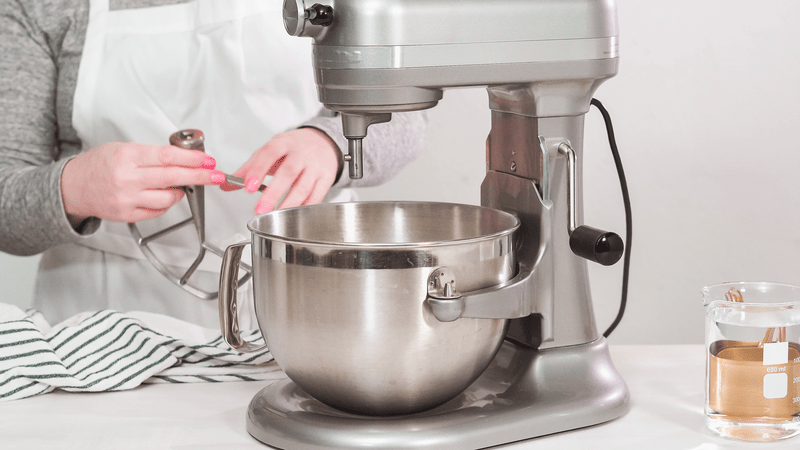
The bowl lift mechanismis on the side of the mixer. It looks like a small lever or handle. This lever controls the height of the bowl.
To find it, check the right or left side of the mixer base. The lever moves up and down.
- Lift the lever to raise the bowl.
- Lower the lever to drop the bowl.
This mechanism makes the bowl fit snugly under the mixer head. It helps the mixer work better without splashing.
Prepare The Mixer For Adjustment
Make sure the mixer is unpluggedbefore starting any adjustment. This prevents accidental startsand keeps you safe.
Remove any attachmentsand the bowl from the mixer. This makes the adjustment easier.
Clear the area around the mixer for better access. A clean workspace helps avoid mistakes.
Locate the bowl lift leveron the side of the mixer. This lever controls the bowl height.
Check the mixer is on a stable surfaceto prevent it from moving during adjustment.
Adjust The Bowl Height Screw
The bowl height screwcontrols the distance between the bowl and the beater. Adjusting this screw helps the beater reach the bowl properly.
First, unplug the mixer for safety. Locate the screw near the bowl lift arm. Use a screwdriverto turn it.
- Turn clockwise to raisethe bowl.
- Turn counterclockwise to lowerthe bowl.
Make small turns, about a quarter turn each time. After each turn, check if the beater touches the bowl lightly but does not scrape it.
This adjustment ensures better mixing and prevents damage to the bowl or beater.

Credit: www.amazon.ca
Test The Bowl Position
Check the bowl position to ensure it is set correctly. The bowl should sit firmly on the base without wobbling. If the bowl is too low, the beater will hit the bowl’s bottom. If too high, the beater won’t mix properly.
Try moving the bowl gently side to side. It should not move freely. If loose, adjust the bowl height for a tight fit. Proper bowl height helps the mixer work efficiently and protects parts from damage.
- Turn on the mixer at low speed.
- Watch the beater’s contact with the bowl.
- Adjust the height if the beater scrapes or misses the bowl.
- Test again after each adjustment.
Fine-tune For Optimal Performance
Adjusting the bowl heighton the KitchenAid Professional 600 mixer ensures better mixingand less mess. The bowl should be close to the beater but not touching it.
Use the bowl lift leverto raise or lower the bowl. If the beater scrapes the bowl, lower the bowl slightly. If the beater misses ingredients, raise the bowl a bit.
Check the height by turning the mixer on low speed. Watch the beater’s contact with the bowl. Adjust until the beater barely touches the bowl’s sides.
- Turn off the mixer before adjusting.
- Raise the bowl by lifting the lever up.
- Lower the bowl by pushing the lever down.
- Test the beater contact at low speed.
- Make small adjustments for the best fit.
Credit: www.homeserve.com
Frequently Asked Questions
How Do I Raise Or Lower The Bowl On A Kitchenaid Professional 600?
Turn the bowl lift lever up to raise the bowl and down to lower it until it fits snugly.
Why Is Adjusting The Bowl Height Important On My Mixer?
Proper bowl height ensures the beater touches ingredients well for better mixing results.
What If My Bowl Doesn’t Lock Properly After Adjusting Height?
Check the lever position and make sure the bowl sits evenly on the base before locking.
Conclusion
Adjusting the bowl height on your KitchenAid Professional 600 is simple and quick. It helps your mixer work better and mix ingredients evenly. Regular checks keep your mixer running smoothly. Remember to follow the steps carefully each time you adjust.
This small task can save you time and avoid mixing problems. Enjoy baking with confidence and ease every time.