Is your KitchenAid refrigerator not tasting as fresh as it used to? Changing the filter is the simple fix you need, and you can do it yourself in just a few easy steps.
If you want clean, crisp water and ice every time, knowing how to change your fridge’s filter is a must. In this guide, you’ll discover the exact steps to get it done quickly and hassle-free. Keep reading, and you’ll never have to worry about stale water or clogged filters again.

Credit: www.youtube.com
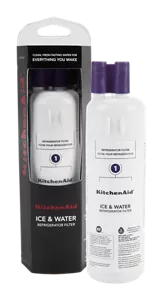
Signs To Replace The Filter
Water taste and smell changesare clear signs the filter needs replacement. If water tastes odd or smells strange, the filter is likely clogged or dirty. Fresh water should taste clean and smell neutral.
The filter indicator lighton the refrigerator signals when it’s time to change the filter. This light turns on or blinks after a set time, usually every six months.
Reduced water flowis another sign. If water comes out slowly or weakly from the dispenser, the filter might be blocked. A new filter will restore strong water flow.
Credit: www.kitchenaid.com
Locating The Filter
KitchenAid filters are often found in three common spots. The upper right cornerof the fridge interior is a frequent location. Another spot is the base grille, near the floor of the refrigerator. Some models place the filter inside the back wallof the fridge compartment.
Check your model’s manual to find the exact filter location. Manuals usually have clear diagramsshowing where the filter sits. They also include instructions on how to remove and replace the filter.
| Filter Position | Description |
|---|---|
| Upper Right Corner | Inside the fridge near the top right side |
| Base Grille | Near the bottom front of the refrigerator |
| Back Wall | Inside the fridge on the back interior wall |
Preparing To Change The Filter
Gather the replacement filterdesigned for your KitchenAid model. Have a wrench or pliersready, if needed, to loosen the filter housing. Keep a towel or bucketnearby to catch any water drips.
Locate the water supply valvebehind the refrigerator or under the sink. Turn the valve offto stop water flow before removing the old filter. This step helps avoid spills and leaks.
Removing The Old Filter
The old filter usually sits inside a small compartment in the fridge. To remove it, find the filter cover. Hold the filter firmly and twist it gently to the left. It will loosen and come out easily. Sometimes, a push button releases the filter. Press the button firmly while pulling the filter out. Be careful not to spill water from the filter. Keep a towel nearby just in case. Once removed, set the old filter aside for disposal. The area inside the filter slot should look clean. Wipe it with a dry cloth if needed before inserting a new filter.
Installing The New Filter
Align the new filter so the arrows point in the right direction. The filter fits only one way, making it easy to place correctly. Gently push the filter into the slot until it stops.
To secure the filter, turn it clockwise until it locks in place. You might hear a soft click sound, which means it is tight and sealed. Avoid forcing it too hard to prevent damage.
- Check the filter fits snugly with no gaps.
- Make sure the filter is flush with the refrigerator wall.
- Run water through the dispenser for a few seconds to clear air.
Resetting The Filter Indicator
The filter indicator on your KitchenAid refrigerator lets you know when to change the filter. To reset it using the control panel, press and hold the filter reset button. Keep holding it for about 3 seconds until the light turns off or changes color. This shows the indicator has been reset.
Manual reset options vary by model. Some refrigerators have a small button inside the fridge near the filter area. Press and hold this button for a few seconds to reset the indicator. Another option is to unplug the fridge for 5 minutes, then plug it back in. This can sometimes reset the system.
- Press and hold filter reset button on control panel
- Look for a reset button near the filter inside fridge
- Unplug fridge for 5 minutes to reset indicator
Flushing The New Filter
Flush the new filter by running water through it for a few minutes. This removes loose carbon and ensures clean water and ice. It also helps the filter work correctly right away.
Running Water Through The Filter
First, locate the water dispenser on your refrigerator. Hold a cup under it. Press the dispenser button. Let water flow for five minutes. This clears out dust and debris. It also wets the filter inside. Ensure the water flows freely. If it slows down, check the filter’s position. Adjust if needed.
Removing Air Bubbles And Impurities
Air bubbles can be a problem. They make water sputter or spray. To remove them, run more water. This helps clear bubbles trapped inside. Hold the cup steady. Watch the water flow smooth and clear. If not, repeat the process. Ensure all bubbles are gone. Your water should now be clean and ready to drink.
Troubleshooting Filter Issues
The filter might not fit if it’s the wrong size. Always check the model number. Make sure to align the filter correctly. If it’s still not fitting, inspect for any obstructions. Clean the filter area gently. Sometimes, old filters can cause fitting problems. Replace them if necessary.
The indicator light may stay on even after changing the filter. This happens if the reset button isn’t pressed. Find the reset button on the fridge. Hold it for a few seconds. The light should turn off. If it doesn’t, check the user manual. Some models have different reset steps.
Water leaks can occur if the filter is loose. Ensure it’s tightly secured. Check for cracks in the filter. Replace it if damaged. Inspect the rubber gaskets. They should be intact and clean. Sometimes, incorrect installation causes leaks. Follow the instructions carefully.
Maintenance Tips For Longevity
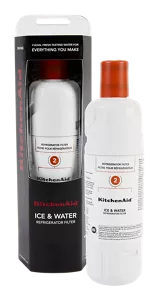
Replacing the water filter regularly keeps water clean and fresh. Most KitchenAid filters should be replaced every 6 months. Mark the date on your calendar to remember. A fresh filter stops bad taste and odors in water.
Cleaning around the filter area prevents dust and dirt buildup. Use a soft cloth and mild soap. Avoid harsh chemicals that can damage parts. Wipe gently to keep the filter slot clean and dry.
- Check the filter status light on your fridge
- Turn off water supply before changing filter
- Twist old filter counterclockwise to remove
- Insert new filter and turn clockwise until tight
- Run water for a few minutes to clear air
Credit: www.kitchenaid.com
Frequently Asked Questions
How Often Should I Change My Kitchenaid Refrigerator Filter?
You should change the filter every 6 months for optimal water quality. Replace it sooner if water flow slows or taste changes.
How Do I Reset The Filter Indicator Light?
Press and hold the reset button for 3 seconds after replacing the filter. The light will turn off, confirming the reset.
What Type Of Filter Fits Kitchenaid Refrigerators?
Use Kitchenaid-approved water filters, typically model UKF8001 or similar. Check your manual for the exact compatible filter model.
Can I Change The Filter Without Turning Off The Fridge?
Yes, you can change the filter without unplugging the refrigerator. Just ensure the water supply is off to avoid leaks.
Conclusion
Changing the filter on your KitchenAid refrigerator is simple and quick. Regular filter changes keep your water fresh and clean. Remember to check the filter every six months. Clean water helps your family stay healthy. Follow the steps carefully, and you will do it right.
Don’t wait until the water tastes bad or the light blinks. A clean filter means better water quality and a happier kitchen. Keep your fridge working well with easy filter changes. You’ve got this!