Is your KitchenAid refrigerator’s water not tasting as fresh as it used to? It might be time to replace the water filter.
Changing the filter is simpler than you think, and doing it yourself can save you time and money. In this guide, you’ll find clear, step-by-step instructions that make the whole process quick and hassle-free. Keep reading to learn how you can easily refresh your fridge’s water and enjoy clean, crisp drinks every day.
Tools Needed
To replace the water filter in a Kitchenaid refrigerator, some simple toolswill help. Keep these ready before you start:
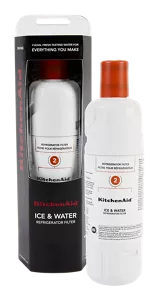
- Replacement water filterdesigned for your model.
- A clean clothto wipe any spills.
- Bucket or bowlto catch water drips.
- Flashlightif the filter area is dark.
Most filters twist out by hand, so no special tools are often needed. Still, having a cloth and bucket keeps things neat.
Locate The Filter
The water filter in a Kitchenaid refrigerator is usually found in two common places.
Inside the Refrigerator:Open the main door and look in the upper right corner or near the top shelf. The filter is often inside a small compartment. It may have a cover that clicks open or a twist-off cap. This spot is easy to reach and check.
Behind the Grill:The filter can also be behind the lower front grill or kickplate at the bottom of the fridge. This area protects the filter and keeps it hidden. You may need to pull the grill off or slide it out to access the filter.
- Check inside first for quick access.
- Look behind the grill if not inside.
- Filters usually twist or pull out easily.
Turn Off Water Supply
Find the water valve near your Kitchenaid refrigerator. It’s often behind or under the sink. Turn the valve clockwise to stop the water. This step is very important to avoid leaks.
Check if the water is off. Try using the water dispenser. If water doesn’t flow, it’s safe. Now, you can replace the filter without getting wet.
Keep a towel nearby. This helps in cleaning any spills quickly. Remember, safety comes first.

Credit: www.kitchenaid.com
Remove Old Filter
Twist and Pull Method:Locate the water filter inside the refrigerator. Turn the filter counterclockwise until it releases. Gently pull the filter straight out. Be careful not to spill water.
Push Button Release:Find the release button next to the filter. Press the button firmly. Pull the filter out smoothly. Keep a cloth handy for any drips.
Prepare New Filter
Start by removing all packagingfrom the new water filter. This includes plastic wrap and any protective covers. Make sure the filter is clean and ready to use.
Next, flush the filterto clear out any loose carbon particles. Run cold water through the filter for about 3 to 5 minutes. This helps improve water taste and quality.
- Remove plastic wrapping carefully.
- Check for any damage or cracks.
- Turn on cold water to flush filter.
- Allow water to run for 3-5 minutes.
Install New Filter
Align the new water filter with the filter slot inside the refrigerator. Make sure the filter’s arrows or marks match the refrigerator’s guide. Insert the filter gently but firmly into the slot. It should fit snugly without forcing.
Once inserted, twist the filter clockwise until it locks in place. You will hear a click or feel resistance to confirm it is secure. Do not overtighten; a firm twist is enough.
- Check the seal to prevent leaks.
- Run water for a few minutes to clear air and impurities.
- Reset the water filter indicator light if your model has one.
Reset Filter Indicator
To reset the filter indicatoron your Kitchenaid refrigerator, first locate the control panelon the front. Press and hold the Reset Filterbutton for about 3 seconds. The filter light should turn off, showing the reset is done.
If your model does not have a reset button, try pressing and holding the Ice Typeand Lightbuttons together for 3 seconds. This also resets the filter indicator.
Resetting the filter light helps remind you when to change the filter next time. It is important to reset after each filter replacement for proper tracking.
Credit: www.kitchenaid.com
Check For Leaks
Check the area around the water filter for any signs of water leaks. Leaks can cause damage and must be fixed quickly. Look for wet spotsor puddles under the filter or inside the fridge.
Make sure the filter is tightly secured. A loose filter often causes leaks. Turn the filter clockwise until it clicks or feels snug.
- Inspect the filter housing for cracks or damage.
- Check the O-rings for wear or tears.
- Replace O-rings if they look old or broken.
- Wipe the area dry before testing the water flow.
Turn on the water dispenser and watch closely. Small drips or steady leaks show a problem. Fix issues before using the fridge normally.
Flush The System
Flush the water system after replacing the filter. This helps remove air and loose carbon bits. Run water through the dispenser for about 5 minutes or 2-3 gallons. Water may look cloudy at first. This is normal and clears up quickly.
Flushing also ensures clean and fresh water flow. Avoid drinking water during flushing. Use it for plants or other non-drinking purposes. Check for any leaks around the filter area after flushing. Tighten the filter if needed.
- Run water for 5 minutes or 2-3 gallons
- Ignore cloudy water at first
- Use flushed water for plants
- Check and tighten filter if leaking

Credit: www.youtube.com
Frequently Asked Questions
How Often Should I Replace My Kitchenaid Refrigerator Filter?
Replace your Kitchenaid refrigerator water filter every six months. This ensures clean, fresh-tasting water and optimal filtration performance. Check your user manual for specific recommendations or filter indicator alerts for timely replacement.
How Do I Reset The Filter Indicator Light?
After replacing the filter, press and hold the filter reset button for three seconds. This action clears the indicator light. If unsure, consult your Kitchenaid refrigerator manual for exact steps tailored to your model.
Can I Use Any Filter For Kitchenaid Refrigerators?
Use only Kitchenaid-approved water filters to guarantee compatibility and safety. Generic filters may not fit properly and can reduce water quality or damage your fridge’s filtration system.
What If Water Flow Is Slow After Filter Replacement?
Slow water flow usually means the filter is clogged or not installed correctly. Check for proper filter seating and try flushing the filter by running water for a few minutes.
Conclusion
Replacing the water filter in your KitchenAid refrigerator keeps water fresh and clean. Regular changes help avoid bad taste and odors. The process is simple and quick with the right steps. Always check your filter model before buying a new one.
Clean water means healthier drinks and better ice. Stay on top of filter changes for best results. Your fridge works better and lasts longer this way. Easy care makes daily life more convenient and safe. Ready for fresh water every day?
Now you know how!