If you own a KitchenAid stand mixer, you know how powerful and reliable it can be. But sometimes, your mixer might not work as smoothly as it should.
Maybe the attachments don’t fit right, or the mixer makes unusual noises. Learning how to adjust your KitchenAid stand mixer can save you time, money, and frustration. In this guide, you’ll discover simple steps to get your mixer running perfectly again.
Keep reading to unlock the full potential of your kitchen helper and make every recipe easier and more enjoyable.
Mixer Components
The mixer componentsinclude the base, motor, bowl, and attachments. The baseholds the motor and controls. The bowlfits securely on the base. Attachments connect to the mixer head for different tasks.
Key partsto identify are:
- Mixing bowl: Holds ingredients during mixing.
- Beater arm: Moves to mix ingredients.
- Attachment hub: Connects accessories like pasta makers.
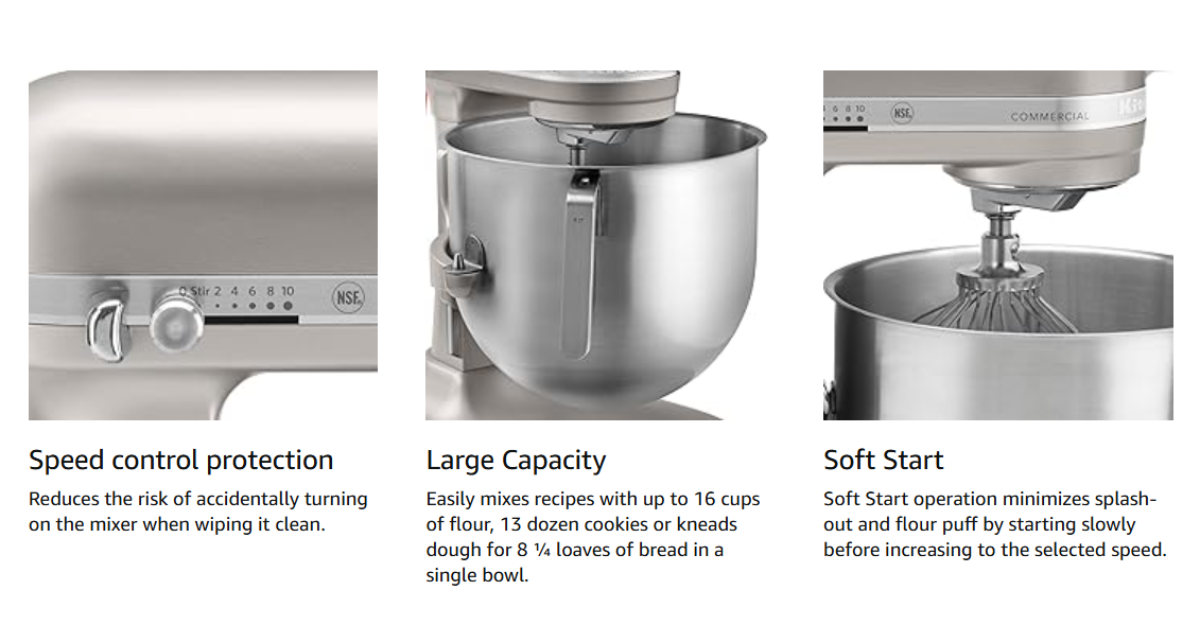
- Speed control: Adjusts mixing speed.
| Attachment Type | Use |
|---|---|
| Flat Beater | Mixes batters, cookie dough, and frostings |
| Wire Whip | Whips air into cream, egg whites, and meringue |
| Dough Hook | Kneads bread and pizza dough |
Speed Settings
The speed dialon a KitchenAid stand mixer controls how fast the bowl turns. Different speeds work best for different jobs. Low speeds help mix thick dough without making a mess. Higher speeds are good for whipping cream or beating eggs quickly.
Here is a simple guide for choosing the right speed:
- Speed 2-4:Mix cookie dough or bread dough gently.
- Speed 6-8:Beat cake batter smoothly and evenly.
- Speed 10:Whip cream or egg whites until fluffy.
Adjust the speed to match the recipe’s needs. Start slow to avoid splashing. Increase speed as the ingredients combine well. This helps get the best texture and mix.
Attachment Installation
Adjusting a KitchenAid stand mixer attachment ensures it fits snugly and works properly. Tighten the attachment hub screw and align parts carefully for smooth mixing. Proper installation improves performance and prevents damage.
Securing Attachments
Begin by turning off the mixer. Ensure it’s unplugged for safety. Locate the attachment hub on the mixer. It’s usually at the front. Open the attachment cover by unscrewing it. Insert the desired attachment into the hub. Align it properly for a secure fit. Tighten the screw to hold the attachment in place. Make sure it’s snug. This prevents wobbling during use.
Switching Attachments Safely
Turn off and unplug the mixer first. Loosen the screw holding the attachment. Carefully remove the current attachment. Store it safely to avoid damage. Choose your new attachment. Align it with the hub and insert gently. Tighten the screw securely. Check for a snug fit. This ensures safe and efficient mixing.
Credit: livegreenspdx.com
Bowl Positioning
Place the bowl on the mixer base. Turn it slightly to the right until it locksin place. This keeps the bowl stable during mixing.
The bowl height can be adjusted for better contact with the beater. Use the adjustment screw under the bowl.
- Turn the screw clockwise to raise the bowl.
- Turn it counterclockwise to lower the bowl.
- Adjust until the beater is close but not touching the bowl.
Proper bowl positioning helps in even mixingand prevents splashing.
Tilt-head Adjustment
The tilt-head of the KitchenAid mixer moves up and down easily. To raise the head, unlock the lever on the side. Lift the head gently until it stays open. To lower, pull the lever again and push the head down slowly.
Locking the head is important for safe use. The lever clicks when the head is in place. This keeps the mixer steady during mixing. Always check the lever is locked before starting the mixer.
| Action | How to Do It |
|---|---|
| Raise the head | Unlock lever, lift head gently |
| Lower the head | Unlock lever, push head down |
| Lock the head | Release lever, listen for click |

Credit: www.kitchenaid.com
Troubleshooting Adjustments
Common issueswith KitchenAid mixers include uneven mixing, unusual noises, and attachments not fitting properly. These problems often come from misalignment or loose parts. Check the attachment huband make sure attachments lock in firmly. For noises, inspect the gear housingfor debris or damage.
Adjust the mixer tiltif it does not mix evenly. Use the adjustment screw at the back to raise or lower the head slightly. This helps the beater reach all ingredients well.
- Clean the mixer regularly to avoid buildup.
- Tighten screws and bolts to keep parts secure.
- Lubricate gears with food-safe grease for smooth operation.
- Check the power cord and switch for safety.
| Issue | Cause | Fix |
|---|---|---|
| Uneven mixing | Improper tilt adjustment | Adjust tilt screw |
| Attachments won’t fit | Loose or misaligned hub | Check and tighten hub |
| Loud noise | Debris or worn gears | Clean or replace parts |
Cleaning And Maintenance
Unplug the mixer before cleaning to avoid accidents. Use a soft cloth dampened with warm, soapy water. Wipe the exterior gently to remove food and dust. Avoid using harsh chemicals or abrasive pads that can damage the finish.
Detachable parts like the bowl and attachments should be washed separately. Most parts are dishwasher safe, but check your manual to be sure. Dry parts completely before reassembling to prevent rust.
| Lubricating Moving Parts | How To |
|---|---|
| Frequency | Every 6 months or as recommended by the manual |
| Type of Lubricant | Food-grade grease only |
| Parts to Lubricate | Gears and moving joints inside the mixer |
| Process | Remove housing carefully, apply grease sparingly, reassemble |

Credit: www.420spotshop.com
Frequently Asked Questions
How Do I Adjust The Speed Settings On A Kitchenaid Mixer?
To adjust speed, turn the speed control lever located on the mixer’s side. Move it smoothly from low to high settings for desired mixing speed. Always start slow to prevent splattering ingredients.
How Can I Tighten The Kitchenaid Mixer’s Tilt-head?
Locate the hinge knob at the mixer’s rear. Turn it clockwise to tighten and secure the tilt-head firmly in place. This prevents movement during mixing.
What Is The Correct Way To Lock Attachments On Kitchenaid?
Insert the attachment into the hub and twist it clockwise until it locks firmly. Ensure it is secure before starting the mixer to avoid accidents.
How Do I Level My Kitchenaid Stand Mixer?
Place the mixer on a flat surface. Adjust the rubber feet by twisting them until the mixer sits evenly to prevent wobbling during use.
Conclusion
Adjusting your KitchenAid stand mixer keeps it working well and lasting longer. Small tweaks help improve mixing results every time. Check the mixer’s parts often to spot any issues. Simple steps make your baking and cooking easier. Enjoy better doughs, batters, and mixes with a properly set machine.
Keep your mixer clean and adjusted for the best performance. A little care goes a long way in the kitchen. Try these tips and see the difference yourself.