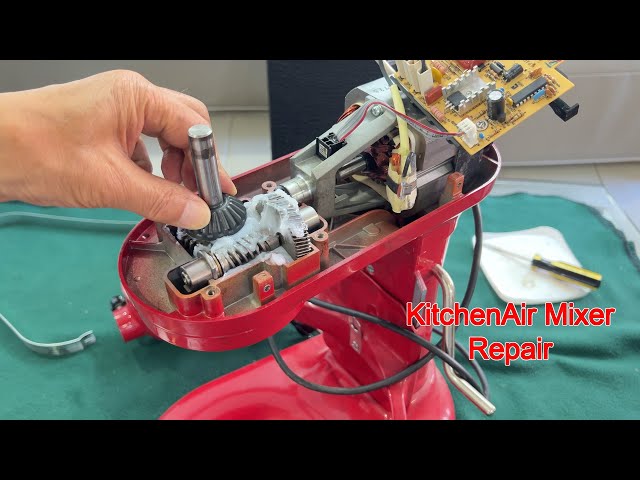
Is your KitchenAid mixer acting up just when you need it most? Don’t worry—you don’t have to spend a fortune on repairs or buy a new one.
You can fix many common problems yourself, saving time and money. In this guide, you’ll discover simple steps to diagnose and repair your mixer, even if you’re not a tech expert. By the end, your trusty KitchenAid will be ready to help you whip up your favorite recipes again.
Keep reading, and let’s get your mixer back in perfect shape!
Common Issues With Kitchenaid Mixers
Motor problemscan cause the mixer to stop working or run slowly. Check for burnt smells or overheating. Sometimes, the motor brushes wear out and need replacement.
Attachment hub issuesoccur when the parts do not fit or turn properly. This can stop attachments from working well. Cleaning the hub and tightening screws often helps.
Speed control failuresmake it hard to change the mixer speed. Faulty switches or wiring problems are common causes. Testing the controls with a multimeter can find the fault.
Unusual noisescan signal loose parts or worn gears. Grinding, squeaking, or rattling sounds need quick attention. Lubricating moving parts or replacing broken pieces may fix this.
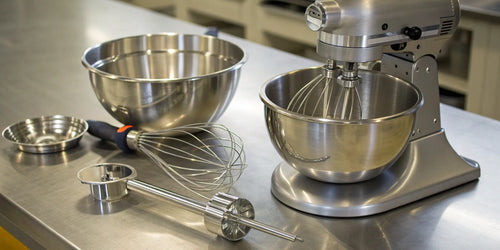
Credit: therestaurantwarehouse.com
Tools Needed For Repair
Basic hand tools make small fixes easier and quicker. Common tools include:
- Screwdrivers(flathead and Phillips)
- Pliersfor gripping and twisting parts
- Wrenchesto tighten or loosen bolts
- Allen keysfor hex screws
Specialized equipment helps with complex repairs. Examples are:
- Multimeterto check electrical parts
- Gear pullerfor removing stuck gears
- Lubricantsto ease moving parts
Safety gear protects you during repair. Important items include:
- Glovesto avoid cuts and scrapes
- Safety glassesto protect eyes
- Maskto avoid dust and fumes
Preparing The Mixer For Repair
Always unplug the mixerbefore starting any repair work. This is very important for safety. Wipe the mixer clean with a damp cloth. Remove any food or dust on the surface to see parts clearly.
- Take off all attachmentslike beaters or dough hooks.
- Keep the attachments in a safe place to avoid losing them.
To open the mixer, find the screws that hold the coveror casing. Use the right screwdriver to remove them carefully. Gently lift the cover to access the internal components. Look inside to find the parts that may need fixing or cleaning.
Credit: www.reddit.com
Fixing Motor Issues
Check the power source by plugging the mixer into a working outlet. Use a different outlet if needed. Make sure the power cord is not damaged or frayed. A loose connection can cause the mixer to stop working.
Motor brushes wear out over time. Remove the brush covers to inspect them. If brushes look worn or broken, replace them. Worn brushes can cause poor motor performance or prevent it from running.
| Replacing the Motor | Details |
|---|---|
| Unplug the mixer | Always disconnect power before starting repair. |
| Remove housing screws | Access the motor by taking off the mixer casing. |
| Disconnect motor wires | Note wire positions for correct reconnection. |
| Take out old motor | Lift the motor carefully from its place. |
| Install new motor | Place new motor and reconnect wires securely. |
| Reassemble mixer | Screw housing back and test the mixer. |
Repairing Attachment Hub Problems
Loose screws can cause the attachment hub to wobble. Check all screws and tightenthem with a screwdriver. If screws are stripped or damaged, replacethem with new ones of the same size and type.
Lubricating moving parts inside the hub helps reduce friction. Use a small amount of food-safe lubricantto keep parts running smoothly. Avoid over-lubricating, as excess oil can attract dust and dirt.
If the hub assembly is cracked or broken, it must be replaced. Purchase a new hub assemblycompatible with your KitchenAid model. Follow the manual to remove the old part carefully, then install the new one securely.
Troubleshooting Speed Control
Test the switch by using a multimeter to check for continuity. Remove the mixer’s casing carefully to access the switch. Press the switch and see if the multimeter shows a connection. No connection means the switch may be faulty and needs replacement.
Clean the electrical contacts with a soft brush or cloth. Dirt and dust can block the connection and cause speed problems. Use a bit of rubbing alcohol to remove stubborn grime. Let it dry before testing the mixer again.
Replacing the speed control board can fix many speed issues. Unplug the mixer before starting. Remove the old board by disconnecting wires gently. Install the new board by connecting wires to the right places. Secure it and test the mixer to make sure it runs correctly.
Addressing Unusual Noises
Strange sounds often signal worn gears or loose parts inside the mixer. Checking and tightening these components helps stop unusual noises. Regular cleaning also prevents build-up that can cause grinding or rattling sounds.
Identifying Noise Sources
Strange noises may come from several parts of the mixer. Check the motor area first. Listen closely to identify the noise location. Use a flashlight to look inside. Check for loose screws or parts.Lubricating Gears
Gears need grease to work smoothly. Find the gear compartment. Open it carefully. Add a small amount of grease. Be sure to use the right type. Close the compartment securely. Test the mixer to see if the noise stops.Replacing Worn Parts
Some parts may be worn out. Look for cracks or damage. Order new parts online or visit a store. Use a screwdriver to remove old parts. Put in the new parts carefully. Make sure they fit well. Test the mixer again. Listen for any changes in sound. `Reassembling And Testing The Mixer
Carefully put all parts back together, ensuring each piece fits properly. Test the mixer by running it at low speed to check for smooth operation. Listen for unusual noises and watch for any issues before full use.
Reinstalling Components
Place each part back in its spot. Ensure every piece fits snugly. Tighten all screws using a screwdriver. Check that the gears align perfectly. Avoid leaving any part loose. Double-check connections for security. A well-fitted part boosts performance. Reattach the mixing bowl securely.
Conducting Safety Checks
Inspect the cord for damage. Ensure the mixer is unplugged. Verify the on/off switch functions properly. Look for any worn-out parts. Confirm the bowl locks tightly in place. Safety checks prevent accidents. Feel assured with every use.
Performing A Test Run
Plug the mixer into a safe outlet. Turn on the mixer at low speed. Listen for unusual sounds. Watch the beater’s movement closely. Increase speed gradually. Ensure the mixer runs smoothly. If it shakes, recheck assembly. A smooth test run confirms success.
Maintaining Your Kitchenaid Mixer
Keep your Kitchenaid mixerclean after every use. Wipe the exterior with a damp cloth. Avoid using harsh chemicals that can damage the finish.
Store the mixer in a dry place to prevent rust. Cover it with a cloth or mixer cover to keep dust away.
| Routine Inspection | What to Check |
|---|---|
| Before Use | Make sure the cord is not frayed and the mixer is stable. |
| After Use | Check for any unusual noises or loose parts. |
| Monthly | Inspect the attachments and gears for wear and tear. |
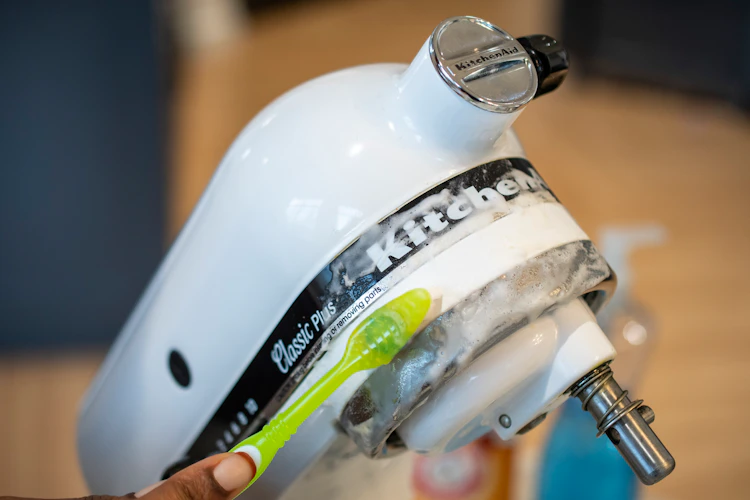
Credit: thekrazycouponlady.com
Frequently Asked Questions
How Do I Fix A Kitchenaid Mixer That Won’t Start?
Check if the mixer is properly plugged in and the outlet works. Inspect the power cord for damage. Reset the motor protector if it’s overheated. If the issue persists, the motor or switch might need professional repair.
What Causes A Kitchenaid Mixer To Make Loud Noises?
Loud noises often result from worn gears or lack of lubrication. Check for debris in the planetary head. Tighten any loose screws. Regular maintenance and cleaning can prevent noise issues and prolong mixer life.
How Can I Replace A Broken Kitchenaid Mixer Attachment Hub?
Unscrew the hub cover using a flathead screwdriver. Remove the damaged part carefully. Align and insert the new hub attachment properly. Secure the cover back in place. Refer to your model’s manual for specific instructions.
Why Is My Kitchenaid Mixer’s Beater Not Rotating?
The beater may be improperly attached or the drive shaft could be stripped. Ensure the beater locks into place. If the drive shaft is damaged, it might require replacement or professional service.
Conclusion
Fixing your KitchenAid mixer can save time and money. Start with simple steps to find the problem. Use basic tools and follow clear instructions. Take your time and be patient during repairs. Small fixes often make a big difference. Keep your mixer clean and well-maintained.
This helps avoid future issues and keeps it working well. Repairing your mixer yourself feels rewarding. Enjoy baking with a mixer that runs smoothly again.