If you’ve just got your KitchenAid mixer or have been curious about how to make the most of it, you’re in the right place. This powerful kitchen tool can save you time and effort, but only if you know how to use it properly.
Imagine whipping up perfect dough, fluffy cakes, or creamy frostings with ease. In this guide, you’ll learn simple, step-by-step instructions that anyone can follow. By the end, you’ll feel confident and ready to create your favorite recipes like a pro.
Keep reading, and let’s unlock the full potential of your KitchenAid mixer together.
Credit: www.kitchenaid.com
Getting To Know Your Mixer
The Kitchenaid mixerhas several key parts. The motorpowers the mixer. The bowlholds the ingredients. The headlifts up to add attachments or ingredients easily. The speed controladjusts mixing speed from slow to fast.
| Part | Function |
|---|---|
| Motor | Drives the mixing action |
| Bowl | Holds ingredients for mixing |
| Head | Holds attachments and lifts up |
| Speed Control | Changes mixing speed |
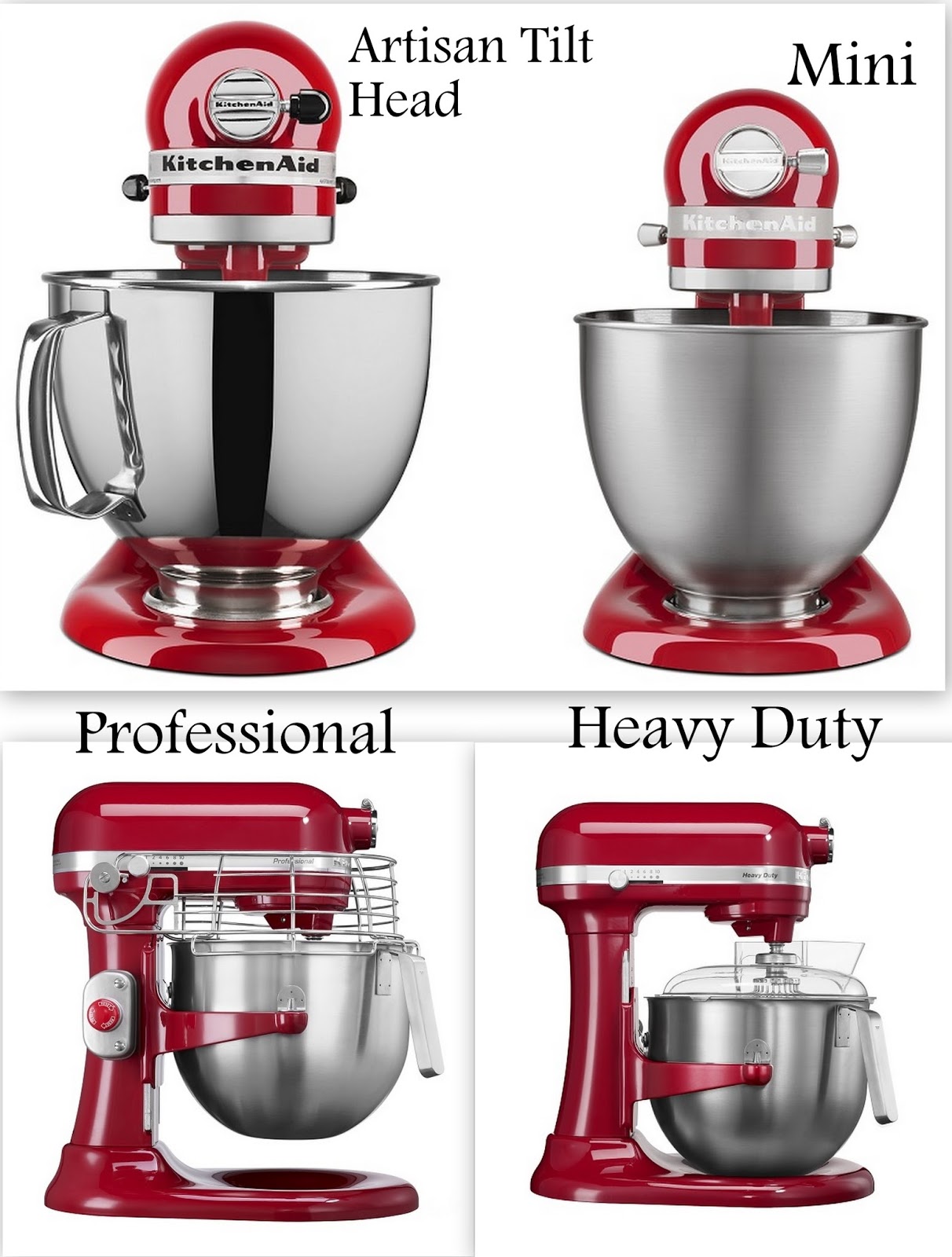
- Classic Series:Basic, good for most baking tasks.
- Artisan Series:More colors, slightly stronger motor.
- Professional Series:Heavy duty, for big batches.
- Flat Beater:For mixing batters and doughs.
- Wire Whip:Adds air to eggs or cream.
- Dough Hook:Kneads bread dough easily.
- Pouring Shield:Helps add ingredients without spills.
Setting Up Your Mixer
Start by placing the mixer on a clean, flat surface. Attach the bowl by aligning it with the base and turning it until it locks. Choose the correct attachment for your recipe, like the paddle, whisk, or dough hook. Insert the attachment into the mixer head and push up until it clicks into place.
Ensure the bowl is firmly locked and the attachment is secure before use. Check the power cord for any damage. Make sure the mixer is unplugged when assembling or changing parts. Keep hands and utensils away from moving parts while the mixer runs.
| Check | Why |
|---|---|
| Bowl Locked | Prevents spills and keeps bowl stable |
| Attachment Secure | Ensures proper mixing and safety |
| Power Cord | Avoids electrical hazards |
| Unplugged Mixer | Prevents accidental start |
Basic Mixer Operations
The Kitchenaid mixer has different power and speed settings. Each setting helps with different tasks. Use low speed for mixing dry ingredients. Medium speed is good for creaming butter and sugar. High speed is best for whipping cream or egg whites.
Choosing The Right Speed
Each speed on the mixer has a purpose. Use the right speed for the best results. Low speeds mix gently. Medium speeds blend well. High speeds whip fast. Adjust the speed as needed.
Starting And Stopping The Mixer
To start the mixer, plug it in. Set the speed to low first. Increase speed slowly. To stop, turn the speed to zero. Unplug the mixer when done.

Credit: www.youtube.com
Mixing Techniques
Beating and whippingmix air into ingredients, making them light and fluffy. Use the whisk attachment on medium speed for best results. Perfect for eggs, cream, and batter. Stop mixing as soon as the desired texture forms to avoid over-beating.
Kneading doughdevelops gluten, giving bread structure and chewiness. Use the dough hook on low speed. Let the mixer run until dough pulls away from the bowl. Do not over-knead; dough should be smooth and elastic.
Folding ingredientscombines delicate parts without losing air. Use a spatula or turn off the mixer and fold by hand. This keeps the mix light, especially for whipped cream or egg whites. Mix gently and slowly for best texture.
Using Attachments Effectively
The Pasta Makerattachment rolls and cuts dough into pasta shapes. Attach it firmly to the mixer. Feed small dough pieces slowly for best results.
The Food Grinderhelps grind meat, cheese, or vegetables. Choose the right plate for coarse or fine grinding. Keep food chilled for easier grinding.
The Vegetable Spiralizermakes long, curly vegetable strands. Secure the attachment and push vegetables gently. It works great for zucchini and carrots.
- Attach securely to avoid slipping
- Feed food slowly for smooth operation
- Clean attachments right after use
- Use correct speed settings

Credit: www.kitchenaid.ca
Cleaning And Maintenance
Remove attachments like the beater, dough hook, or whisk before cleaning. Detach the bowl carefully to clean separately. Wipe the mixer body with a damp cloth. Avoid using harsh chemicals that may damage the surface.
- Unplug the mixer before cleaning.
- Use warm, soapy water for attachments and bowl.
- Dry all parts completely before reassembling.
- Never immerse the mixer body in water.
- Clean the attachment hub regularly to prevent buildup.
| Maintenance Task | Frequency | Tip |
|---|---|---|
| Lubricate gears | Once a year | Use manufacturer-recommended grease |
| Check power cord | Monthly | Look for frays or damage |
| Tighten screws | Every 3 months | Use a small screwdriver |
| Clean vents | Monthly | Use a soft brush or compressed air |
Troubleshooting Common Issues
Mixer Won’t Start:Check if the mixer is plugged in properly. Make sure the power switch is on. The outlet might not work; try another one. Look for a reset button on the mixer and press it if needed.
Unusual Noises:Strange sounds can mean something is stuck inside. Turn off the mixer and unplug it. Remove the attachments and check for hard bits or food stuck. Clean the attachments and try again. If noise continues, the motor may need service.
Attachment Problems:Attachments should fit tightly. Remove and reattach them firmly. Make sure the attachment is the right type for your mixer model. If it won’t lock in place, check for dirt or damage on the fitting parts.
Frequently Asked Questions
How Do I Start Using My Kitchenaid Mixer?
First, secure the mixer on a flat surface. Attach the desired accessory, then plug it in. Turn the speed dial slowly to start mixing.
What Attachments Work Best With Kitchenaid Mixers?
Popular attachments include the flat beater, dough hook, and wire whisk. Each suits different tasks like mixing, kneading, or whipping.
How Do I Clean My Kitchenaid Mixer Properly?
Unplug the mixer and remove attachments. Wash attachments with warm, soapy water. Wipe the mixer body with a damp cloth only.
Can I Adjust The Speed On A Kitchenaid Mixer?
Yes, KitchenAid mixers have multiple speed settings. Start low and gradually increase speed for better control and mixing results.
Conclusion
Using a KitchenAid mixer can save time and effort in the kitchen. Start with the right attachment for your recipe. Always secure the bowl and choose a proper speed. Clean the mixer after each use to keep it working well.
Practice makes using it easier and more fun. Enjoy creating delicious meals with less hassle. This tool helps both beginners and experienced cooks. Try new recipes and experiment with different settings. Your cooking routine will become smoother and more enjoyable.